Thursday, 17 June 2021

How To Remove Android Keyboard History

How do you remove / delete Android Lollipop OS keyboard history. Although now considered as slightly dated as far as Operating Systems go, Android Lollipop still remains one of the best and most stable of all the Android OS versions, past and present. Even now in 2021, Worldwide It's still used by many people. As with anything Android based, the Lollipop interface is extremely easy to use. 

The_Android_Man_Is_Here_To_Help
 

However, some of the back end settings and functions could have been worded better so that a laymen can understand how to perform certain tasks. This is the case with clearing the history. The procedure (what you need to click) is not exactly spelt out in easy to decipher computer language in terms of understanding that what you are clicking is going to end up reaching the desired conclusion. Anyway, it's easy enough once you know how. So here it is. Please Note: The procedure is very similar for the newer operating systems, such as Marshmallow, Oreo, Pie etc.


How To Remove Android Lollipop OS Keyboard History

  • Tap the settings (cog) icon
  • Choose "Language & Input"
  • Select "Android Keyboard Settings (AOSP)"
  • Select "Text Correction"
  • Turn off "Personalised Suggestions"


After you have done the above the keyboard history will not be saved any more. But be aware that predictive text is still activated. If you want to reverse this action because you only wanted to delete a specific search term on a once only basis (re-enable the saving of what's typed in), all you have to do is go through the above sequence again and just turn ON "Personalised Suggestions".

When keyboard history retention is not turned off, or not cleared, once the user starts to type something in, by default Android will automatically throw up previously typed in phrases and searches as suggestions based on what has been typed into the keyboard in the past. This can be a real privacy issue if you are using a shared device. or let someone borrow it as a favour. 

Reasons for deletion vary, but it could be something as innocent as buying a surprise gift for someone that you want to keep it a secret from, or you just find it an annoyance that someone else's search terms keep presenting themselves every time you type a word or letter in. However, in many cases, it can be very embarrassing too.


Because let's face it, with online searches relating to porn rising year after year, not just in the UK, but world wide (That goes for searches by both males and females - Yes, much research has been done), it's very plausible that a lot of people who want to remove their search / keyboard history are doing so because their previously stored keyword searches will be related to porn. For many individuals, this is a very private topic, and for some, it could even get them into trouble with their other half.

Most users aren't aware that this information is actually being saved until they see search terms they'd forgotten about being suggested to them, then I imagine that's the time to quickly scramble over to the Internet and find out how to resolve the issue. Whatever the reasoning, I hope it was resolved here. Look out for future "How To" posts coming soon on TabletZap, as they will be added more frequently going forward.

Tuesday, 1 December 2020

Cheap But Good Tablets List UK

Cheap But Good Tablet PC List UK. There have been a few lists compiled on this blog that have included some of the best Tablets to buy in the UK. Well, after more research, here are four more great Tablet deals to consider if you're on a tight budget. Each one is still low in price, so they are all excellent value for money. Please Note: All prices, if included, are subject to change at any time. Updated for 2020/ 2021. More RAM, up-to-date operating systems and better Processors are found in all the upgraded models within this list. Including the Neocore E1: https://tabletzap.blogspot.com/2018/08/neocore-e1-reviews-not-bad-tablet.html

TaoHaoHuo 10 Inch Android Tablet

 
The 10" TaoHaoHuo has an A33 Quad Core Cortex-A7 Processor, which consists of 4 x 1.3Ghz Cores. It also has Mali-400, which is basically a built-in graphics card, but in many ways a much cleverer one that is a perfect match for the TaoHaoHuo's A33 Quad Core Quad Core Processor.

TaoHaoHuo-10-inch-Tablet-PC

This TaoHaoHuo has now been discontinued. See an alternative here.

The operating system installed on this Tablet is Android Kit Kat. A lot of the cheaper Tablets have an 8GB hard drive and 512MB RAM but this one has double that with 16GB of internal storage and 1GB RAM (DDR2). Perfect for all the usual things like playing games, watching films, Apps, reading books, music, Interneting, and doing Afterschool studies! Get yourself an add-on external keyboard and mouse and it becomes a mini-laptop. A cheap little workhorse.

Bluetooth and USB On The Go are present. The 10 Inch TaoHaoHuo Tablet also supports an external 3G device (dongle). The Dual cameras are the same basic quality that most of the cheap Tablets have. A third of a megapixel front facing camera, and a 2MP camera at the back. Overall this is a great little package for the low price. And taking into consideration the specifications, this Tablet will should be a good multi-tasker for the price.

Another potential bonus depending on the quality of the lithium Ion battery itself is that the battery in this Tablet has a bigger capacity than a lot of the other Tablets have that fall within this price range. The battery is 5000mAh. Whether or not that converts into the battery actually lasting longer will be down to the user to determine from using the Tablet daily. Reviews are good. And there's a 12 month UK warranty included for peace of mind.

Fusion5 7 Inch Quad Core IPS Tablet

 
A Fusion5 Tablet was included on the previous list, and it was a bigger sized Tablet (9 Inch) than this 7 Inch model. However, this 7 Inch Fusion5 Tablet is an updated version in more ways than one. Being one of the updated models, It has slightly tougher, more durable build quality. And also has many of the latest features that are seen in other Tablets from different brands currently new on the market, like an IPS display and the latest Android 5.1 Lollipop operating system (Now PIE). If you're not aware, an IPS (In-Plane Switching) display basically means better, more vivid colours and the ability to see what is displayed on the Tablets screen more clearly when looking at the screen from obscure angles. The Tablet is around half an inch is thickness.


The Fusion5 7 Inch Tablet also has 1GB RAM and a built-in 8GB of Flash storage space (Upgradable to 32GB maximum). The Quad Core Processor is made up of 4 x 1.2Ghz Processors. This is an excellent little Tablet that has impressive reviews. But then again, most Fusion5 Tablets do have good reviews. The Fusion5 7 Inch will be more than enough for most people who want to read books, play games, surf the Internet, Youtube etc, with a fast and responsive Tablet that won't break the bank.

Comes with mini USB cable and charger. This Tablet, like the rest from Fusion5, comes with a 1 year warranty included. It also has all the usual features most cheap Tablets have like dual cameras, 3.5mm headphone jack, micro SD card slot etc. But please note: This Tablet does not have Bluetooth or GPS. Still a great deal.

Tabtronics KAPOW 7'' Childrens Android Tablet Bundle

 
If you're looking for an excellent little Tablet bundle deal to give to a child as a gift, this Tabtronics KAPOW 7 Inch Android Tablet Bundle is going to be hard to beat. For £50 you get a fairly powerful, responsive 7 Inch Tablet, a neat little Tablet case, and a pair of kids headphones.The Tabtronics KAPOW 7 Inch Tablet has an A33 Quad Core Processor (4 x 1.2Ghz Cores), Android Kit Kat 4.4 Operating System, 8GB hard drive, 512MB RAM, Bluetooth, WiFi, built-in microphone, 3.5mm headphone jack, Micro SD card slot and dual cameras.
 
TABTRONICS-KAPOW-7-KIDS-Tablet1
 
 
It's a great Tablet for kids or someone who is new to the Tablet world and wants something that's basic and easy to use, but still very capable. It comes pre-loaded with Google Play, and because it's an Android Tablet your child can download as many games, educational or otherwise, as they so desire. This will keep them occupied for hours.

Be aware though, 8GB of storage will not last very long if you are downloading lots of apps, TV series from BBC iPlayer, or films. You will most probably need to buy a Micro SD card to add extra storage space. This is the same as any Tablet that comes with 8GB of storage space because around 3GB will have been used up by the operating system and other files and software that the Tablet comes installed with.

Thankfully, SD Cards are cheap to buy. You can get a 32GB Micro SD card for very cheap. A 12 month UK warranty is included with this deal. You don't have to buy this Tablet as a bundle. It can be bought on its own. Tabtronics KAPOW 7" is available in Pink or Blue.
 

 Honourable Mention

 
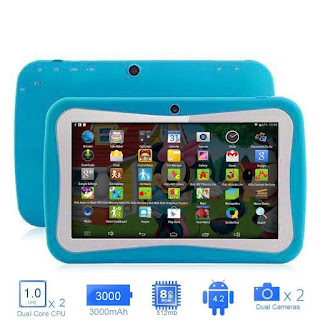
If you're on a really tight budget and need a decent Tablet as a Christmas present for the kids, the EUHubb 7 inch Android Tablet is well worth a look. It has many great reviews and is very cheap to buy. You can get the Dual Core model for a low price. Or you get the Quad Core model, which will perform better, for a little more. Both have 8GB of built-in storage space, 512MB RAM, WiFi, dual cameras, headphone jack, and a Micro SD card slot.


EUHubb-Kids-Computer-Tablet_UK
 
Updated model for 2020 / 2021 (12 hour battery life, 32GB Storage space)
 
It has parental control software ready to be set up already on the device. Google Play is present and it also comes with lots of kids games pre-loaded and ready to go. One negative is that the battery life isn't that long. Other than that the EUHubb 7 inch Android Tablet is a good little deal. It's not just for kids, adults can also use this Tablet and be able to do everything they could on any other Tablet that's considered as an "Adult" model. Available in Blue or Pink.

Saturday, 4 July 2020

The Best Linx 8 Inch 10" Tablet Case

A wide selection of accessories are available for Tablets. From touch screen stylus pens, external keyboards, screen protectors, and of course protective cases. They are all just as important as each other. One case that really stands out from the rest, is the Linx 8 PU Leather Folio Case made by Fintie. It's very well made and has a multitude of great little features that a lot of the other cases just don't have. All round quality being the main, most noticeable one. It looks really neat and professional.

Linx-8-Case
Click here to check out the full range of 8 Inch Tablet Cases that fit the Linx 8 and 810B. Looking for a case that fits the 10 Inch models of Linx - Find them here. There's also some great cases available for the 12 Inch models, including the 12X64 and 12V64 - Find them for sale here.

The outer layer of the case is scratch proof and made from tough PU leather. The inner layer is made from a gentle microfiber fabric which helps keep the screen protected and blemish free. It has a stylus pen holder so that when not in use the pen sits neatly at the side of the case. The stylus pen is not included with the case but it is extremely cheap to buy. The stand capabilities feature a picture frame style angle for watching videos or viewing pictures.

tabletpc-cases-uk

That is available as landscape or portrait, whichever you prefer to use. And there is also a lower, tilted position which makes tasks like typing with the virtual keyboard, and even general usage on a flat surface feel nice and comfortable. And of course, it can be closed up so it looks like a diary with the tablet completely concealed. With the case fitted you still have the ability to press any button or access anything else, like the USB port on the Tablet device itself. You can even use the camera with the case fully fitted.

This is most probably the best case out there for the Linx 8" Tablet. The good news is it's also available for the other sized Linx Tablet models like the 7" and 10 Inch. The 8 Inch case also fits the 810B model. And there's more good news. The price is the same for the 7", 8" and normal 10" Tablets. The only model where this case is more expensive to buy is for the Linx 1010B. By most accounts the fit of these cases is super tight, making it extremely well fitted and secure. That's exactly how you want it to be when its holding your nice new Tablet inside.

The different colours available make this case suitable for just about anyone. Here is the full range of colours and designs that are for sale. Black, Blue, Green, Magenta, Navy, Purple, Leopard Magenta, Leopard Rainbow, Newspaper design and Vintage Map. Lots to choose from. This is a great product for the price. See all the designs and colours.

What about Customer Reviews


Customer feedback for this case is mostly excellent. The big majority of customers are impressed with its quality for the price. However, like any product, there are some negative reviews. But it should be noted: The positive reviews far outweight the bad ones. For most people this is one of the best covers for the Linx range mentioned here. The most common complaint is the fitting, backed up by the functionality.

Some people say the case just doesn't fit their Tablet even though they bought the correct size for their model of Tablet, making it hard to use the touch screen options at times. However, due to the Linx models having the Windows operating system installed it is possible that it's actually Windows itself causing the problem. Certain applications (Apps), don't mix well with Windows at this time and won't fully fit the screen.

So that may actually be the culprit with some of the reviews, not the case itself. Although, it does seem like there is some confusion among buyers as to which is the correct size for there model. Especially between the normal Linx 10" and Linx 1010B.

Functionality: A few customers say some of the buttons can't be used properly when the case is on. And a select few said using the external keyboard with the cover on can be a bit annoying. All the little hindrances aside, this case has one of the best review scores on Amazon. And that says a lot on its own.

Friday, 22 February 2019

Google Nexus Tablet Battery Replacement

The Nexus Tablet range by Google. Great devices. But like the rest of the top tablet brands, including Samsung, ASUS and Apple, Google Nexus' (7 Inch, 8.9", 10 Inch, etc) are not without a few common problems. Some of which are predictably related to the internal battery. Battery totally dead, not charging, can't hold a charge, tablet won't turn on. These are some of the more frequent issues related to the battery. Although "won't turn on" could be one of many other reasons. In fairness, some of these things are just related to wear and tear, as Tablets are unfairly considered as disposable products.Furthermore, many tablet brands suffer from poor quality battery's that don't last as long as users would like. Just take a look a some of the Linx range for confirmation of this (similar problems to what's talked about in this post).

Taking into account the price of a good tablet, which is not cheap, this "disposable" tag really needs to be changed. And the big brands really need to start building tablets that have a much easier-to-replace construction, where the battery can be removed at any time. Just like with a camera or non-smartphone. This would make it much easier to replace a tablets power supply than it is now, where the owner has to literally open the device up and fit it themselves.

Google Nexus Tablet Battery Replacement - New Life


If your having issues with your Nexus and are thinking about whether to buy the kit and replace the battery, try to be as sure as possible that the problem your device has will be fixed when the battery is swapped out for a new one. I say this because a replacement is not cheap. In fact they are pretty expensive. They cost enough for a user to consider either buying the kit, or putting a little extra money and just buying a brand new tablet.

Where To Buy?


For instance, the Google / Samsung Nexus 10 battery kit is one of the more expensive. However it does come with everything needed for a successful swap over. That includes instructions, tools for helping with the opening / fitting, and also comes with a 12 month warranty. The kit offered by NewPower99 comes with a 9000 mAh capacity 3.7v Battery. You can find it for sale here in the UK. Beware of dropshippers on eBay UK selling the exact same item but adding their £30 -£40 profit on top. The real company selling this item also include a step by step video to help guide you through the fitting process. I have included the YouTube repair guide video below.

Instruction Video For Installing (Nexus 10)

You could always just leave the tablet plugged into the mains, and that would be fine. That's up to you. But it does restrict the portability of the device somewhat, and certainly takes the element of being mobile and using it "wirelessly" away. The swapping over / installation process isn't very hard to complete. Some people are really attached to their Nexus, they are great tablets that can be difficult to replace in a marketplace drowning in cheap devices with bad reviews. So for the Nexus lovers it is worth buying the kit. Fix or risk buying a different model. It's your call.

Thursday, 30 August 2018

Neocore E1 Reviews - Not A Bad Tablet

As far as reviews go, genuine ones, The Neocore E1 is definitely sitting in a good position at the moment with its high trust score on many online outlets and tablet review websites, including Amazon, eBay, and of course, it's own website (myneocore). So what's the secret to building a good tablet that's still affordable for customers? Well, it really comes down to ethics, vision and pride in workmanship. It's the same with any successful business, that places pride and quality electronics into their products and puts the customer first. They wouldn't, or shouldn't build a cheap flimsy product full of dangerous components to rake in a bit more profit and expect it to go down well with customers.

neocore-e1-tablet-reviews

That's why brands like Neocore have lasted longer than many of their "competitors", who were just trying to build tablets for the cheapest price possible, make some quick cash, and get out of the game. That's not how you go about creating a long term business. Anyway, enough about that. I think you get the idea. They have put some care and pride into what they build and sell to the public.

Neocore E1 General Spec


Back to the E1. For the price, it's really not a bad tablet. Good, responsive touch screen, nice, vivid colour clarity from the HD 10.1 IPS display, a genuine glass screen, decent Mediatek 64bit Quad Core Processor, 16GB built-in HDD, 1GB RAM (or 2GB if you buy the latest model), good battery duration, super energy saving standby mode and a big memory card capacity. With the previous generation it could hold up to 200GB of extra space via SD card expansion.

Updated Model Enhancements


But in the latest model that has been expanded further to 256GB. That's really good for a tablet in such a cheap price category. Two stand out features in the E1 are a good strong WIFI (Dual compatible) signal and a stable, reliable Bluetooth connection. There's many more good features in this model, like GPS, headphone socket, mini HDMI port, front and back cameras, 2 integrated speakers, Micro USB port, and a 2 year warranty.

It can handle a respectable level of multi-tasking, or the loading of resource demanding games or programs. Although when it comes to the really heavy stuff, like RAM hungry games and resource intensive programs, the 2GB model is much better equipped. The good news is, if you buy one today (either grey or black version) you will be buying the model that comes with extra RAM inside. And it also comes with Android 7.0 pre-installed rather than 6.0 in the earlier model, which can be a pain to update. Another bonus is an anti-slip rear casing for easier, more secure handling. Check out the latest version.

Golden Oldies and Competitors


The Neocore E1 is one in a long line of Neocore's, some of which have now been discontinued, or just seem to be out of stock anywhere they are usually for sale online. Great models like the B1 and C1. The N1 and N1F are still available, and have very good review scores like the E1.

What rivals the Neocore brand. There are a few that could be considered just as good, if not better in some areas. Amazon's Fire range are good devices, but they shoot themselves in the foot with the amount of advertising and limitations they have put on their devices when it comes to freedom of choice.

Fusion5 have some excellent tablets that have close to no limitations, and they are just as feature rich as the Neocore range. The MediaPad's presented by Huawei offer the T and M models (T3's are excellent, as is the complete M range), and they are very hard to beat when it comes to price vs features, reliability, and value for money.

TabletZap should also give a shout out to some of the tablets offered by Lenovo, especially the Tab3, as its a strong rival for the products mentioned here. Overall the E1 is a good solid tablet for general, everyday use and should last a long time if treated with care. What's in the box. Obviously, as well as the device itself, this model comes with USB charger, cable (for charging + data transfer) and user manual.

Thursday, 2 February 2017

Using a Tablet PC Vs Going to Work

They're nice to play with, but do they make life easier?


I've been told that the greatest ideas solve problems that we didn't know we had, but I'm not sure tablets have solved much for me. I can say netbooks have been very useful when they have good battery life, but I have many uses for laptops that are more portable. To me, portability and function are key. A Netbook is an improvement over a laptop because they're not very expensive, easier to carry around, and are just as functional for most office work. Tablets, on the other hand, occupy a strange place where I think we haven't really gotten to yet.

I held off on getting a tablet device until about last fall, when I bought a used slate. The tablet PC market has been depreciated by the influx of touchpad devices, and three-thousand dollar slates can be picked up used, in new condition, for around two-hundred dollars. I bought one because it had a good digitizer that enabled me to take long-hand notes for classes, which I thought might be more useful than a touchpad. I really don't have much use for a touchpad device that isn't designed for writing in some way. However, after several months of usage, the slate has become a laptop, the pen hardly gets used, and I'm using my netbook more.


The problem is that most environments aren't set up to easily accept these devices, and they're designed for general use, and are thus not the best at anything in specific. For my slate, I thought it would be great to never have to make paper notes, but the maintenance of keeping everything digital and available, all the time, was just too much. Even a windows slate with Office requires too much conversion. Transferring PDFs to note formats is a troublesome task, and often takes longer than printing the documents.

Also, it's really only a matter of time before you start making a to-do pile of documents that either need to transferred to a different location, or scanned. The tablet just became another chore when it came to integrating it into the existing work system in my life, and my windows slate, with all the software, 10 hours of battery life, and digitizer pen wasn't as effective as working the same way everyone else was in the office.

I can only imagine how useless my purchase would have been without the pen, and without sharing the same OS as my work environment. Perhaps there will come a time when tablets alone rule the business world, but I don't see it happening any time soon. In a work environment that is specifically designed to work without tablet devices, you're only making more work for yourself for trying to shoehorn it in.

Monday, 12 December 2016

Wacom Cintiq 13HD DTK-1300 Art Tablet

Graphics tablets are a sort of modern version of pen and paper. The device is most-commonly used by designers for drawing images by hand. If your job involves drawing graphics and animations, you need a device that is fast and reliable. This is where Wacom Cintiq 13HD DTK-1300 steps in to save the day.There have been so many reviews written about this product that you have to ask, what else really needs to be said.. Most of the reviews only have good things to say about this graphics tablet. Read an in-depth review here [link removed-read on below], or take a look at the mini hands on review video below while you read the rest of this feature low-down.

This graphics tablet has everything you will need – it does an extremely fast digitizing job (turning hand-drawn images into digital signals), but it's also lots fun to work with. Because of its 16.7-million-colours LED display, it really is a joy to design with. These are just a few nice things about this product, there are many more good points to cover.

Features of the Wacom Cintiq 13HD DTK-1300


This digitizer seems ideal for professionals who appreciate quality. If you are a graphic designer or your job involves creating 2D video game characters, this tablet might just be your best choice. There are a number of reasons for this claim, starting with the fact that its impressive high-resolution display provides you with a perfect picture at a 178° viewing angle. On top of that, designers will also find its Pro Pen pretty useful. In fact, the pen is what sometimes makes the difference between a good and a bad drawing tablet. Wacom’s Pro Pen definitely belongs to the quality pens category as it covers 2048 levels of pressure.


It also features a tilt recognition technology. On top of everything, the drawing pen is nice to use due to its ergonomic design. Speaking of ergonomic design, the same is the case with the tablet itself. It’s easy to handle and is very compact. With its dimensions being 375 x 248 x 14 millimetres, and weight of 1.2 kilos, you won’t have problems moving this tablet from one place to another. An additional feature that provides comfort is the 3-in-1 cable, which won’t cause cable clutter. Although it can sometimes hinder movement if you are someone who likes to design / draw when sitting at odd angles. When it comes to the cable, it is used to connect the device to a Windows based PC or Apple Mac. Will work just fine with a laptop too.

Wacom Cintiq 13HD Specifications


  • Display – What makes this device stand out from the competition is its HD LED display. We’ve already mentioned that it renders 16.7 million colours, but it is important to note that it creates an extremely sharp image because of the high number of pixels. By high, we mean that its resolution is 1,920 x 1,080.

  •  Pro Pen – In order to draw good images on the drawing tablet, you need to have a quality stylus. The Pro Pen has 2,048 levels of pressure-sensitivity, same as many other pen-like styluses. However, Pro Pen also features an ergonomic design and tilt recognition tech, which is one of the reasons why Wacom Cintiq 13HD is more expensive than its rivals. 

  • 3-in-1 Cable – Connecting this device with PC or Mac is fairly simple. All you have to do is connect the two devices via the 3-in-1 cable and that's it. You're let free to create art work.

  • Shortcut Buttons – This device features customizable ExpressKeys, which you can set to perform tasks that you need most often. There’s also the Home button and the Rocker ring.

  • Detachable Stand – This review wouldn’t be complete if we didn’t mention that Wacom Cintiq 13HD comes with a detachable stand that offers three working angles to choose from. If you prefer holding the tablet in your hands or on the desk, you can simply detach the stand.

Pros & Cons


The chances are that you’ll love this product if you are a graphic designer who does lots of sketching and drawing, especially because of the following features:

  • Excellent HD LED display
  • Ergonomic Pro Pen
  • Detachable stand
  • Compatibility with Mac or Windows
  • Compact dimensions and light in weight
  • 3-in-1 cable that prevents clutter

When it comes to the bad points about this product, they are not easy to find. Wacom rules the roost at this price point. Still, there are things that could be better, like these two for example:

  • Price – Although it isn’t an expensive tablet, there are similar products that cost less than Cintiq 13HD. One of those is Artisul D13. Admittedly, this digitizer is almost just as good as the Cintiq 13 DTK-1300, and it costs less to buy. 
  • Drivers – Some people have had a hard time getting the drivers to work with their system. Although, most people who encountered problems did manage to find the solution online and get up and running without too much of an issue. 

Final Verdict


Cintiq 13HD DTK-1300 was developed by Wacom to be used as a tablet for drawing and sketching. It has everything you need to take those two tasks to a whole new level. In fact, it’s almost guaranteed that you will have a great time working on it as its display is a wonder to behold. It also comes with an excellent pen and all the features needed for doing a good design work. The only downside of it seems to be the fact that it’s a tad pricier than the rest, but in the long run, it pays off handsomely with the quality of work you are able to produce. Since this "review" was written, there has been a few newer models released in various screen sizes.

The updated version of the model talked about here, is the Wacom DTH1320AK0 Cintiq Pro 13". Reviews are quite mixed, and make an interesting read. Some good, some bad. A lot of of the bad reviews stem from either the drivers being hard to install, or an overall annoying out-the-box experience coupled with poor build quality. With that said, and with all other things considered, including the price differences, I would go with the older model.